cat ~/apple-pay.yml> Inserted on: 2026-02-21 12:00:00 +0000
> Total Words: 2023
> Estimated reading time: 12 Minutes
==========================================
Most people tap their phone to pay and move on with their day, but there’s a well-engineered security architecture behind Apple Pay that deserves a proper breakdown, so that’s what we’re doing here.
I’ve referenced Apple’s Platform Security Guide, their Merchant Integration Guide, and the Platform Security docs throughout this post.
What’s Wrong with Physical Cards?
To appreciate what Apple Pay does, we need to understand why the traditional system is broken.
When you swipe or insert your credit card at a terminal, your Primary Account Number (PAN) (the 16-digit number on the front) gets sent along with your expiration date and CVV to: The Merchant, their Bank, the payment network, and your bank. Every hop in that chain stores, processes, or transmits cardholder data, which is exactly why PCI DSS exists. If any of them get compromised, your card info is stolen.
The worst part is, they get compromised constantly. Payment card fraud hit $33.41 billion worldwide in 2024 according to the Nilson Report. The US alone accounted for 42% of those losses despite handling only 26% of global card volume. The FTC received over 449,000 credit card fraud reports that year. 62 million Americans had fraudulent charges, and 92% of unauthorized transactions involved cards that weren’t physically stolen, the data was lifted digitally. Card skimming at bank ATMs jumped 90% year-over-year in 2023, averaging around 200 cards compromised per incident.
The mag stripe is the worst offender. Everything someone needs to clone your card gets transmitted in cleartext on a swipe. Chip cards are better, but your PAN is still exposed to the merchant. And none of it requires biometric auth, anybody who picks your card up off the ground can tap it under the contactless limit, no questions asked.
Tokenization
This is where Apple Pay changes the approach.
Instead of sending your real PAN, Apple Pay swaps it for a Device Account Number (DAN). The DAN maps back to your real card number, but only inside a secure vault controlled by the Payment Network’s Token Service Provider (TSP). If your DAN is intercepted, it’s worthless on its own.
The TSPs are run by the card networks, Visa has the Visa Token Service (VTS), Mastercard has the Mastercard Digital Enablement Service (MDES), and Amex has the American Express Token Service (AETS). They’re all registered with EMVCo.
“Apple doesn’t store the original credit, debit, or prepaid card numbers that you use with Apple Pay.” — Apple Pay security and privacy overview
Not on your device. Not on their servers. Not in iCloud.
The Hardware
Two dedicated chips make this work. Hardware, not software.
Secure Element (SE)
An industry-standard certified chip running the Java Card platform. EMVCo and Common Criteria certified, same bar as the chip in your physical card.
It’s physically isolated from iOS, any malware on the phone can’t reach it. It’s also tamper-resistant, if you try to physically extract data, the chip will wipe it’s stored keys and data. It hosts payment applets encrypted with keys only the payment network knows.
During a contactless payment, the terminal talks directly to the SE through the NFC controller on a dedicated hardware bus. The payment data never hits the Application Processor. (Apple Pay Component Security)
Secure Enclave
A separate subsystem with its own processor, boot ROM, random number generator, and AES engine. All biometric data lives here, your Face ID map and Touch ID fingerprint are stored exclusively in this chip and never leave it.
It also enforces what Apple calls “Secure Intent”, a physical link from the side button to the Secure Enclave that software can’t spoof, even with root access.
The Secure Enclave handles identity. The Secure Element handles the payment. Two chips, two jobs.
Adding a Card
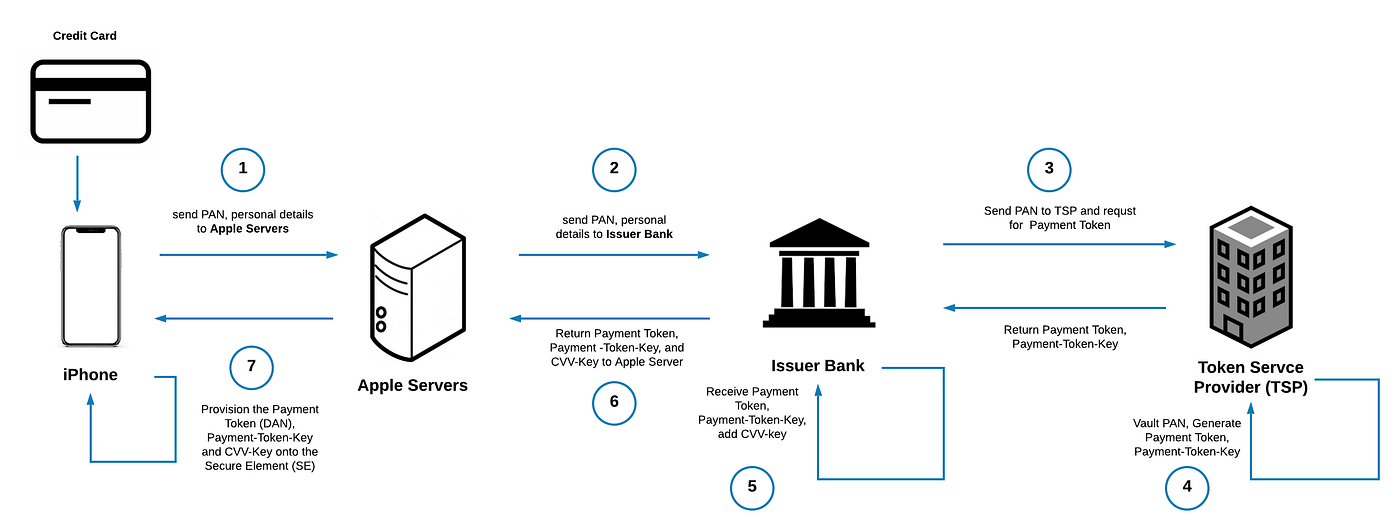
When you add a card to Apple Pay:
1. Your card info gets encrypted and sent to Apple over TLS 1.2+.
2. Apple forwards it to the Payment Network (Visa, Mastercard, etc).
3. The network validates it with your issuing bank.
4. Your bank asks the TSP to generate a DAN. The TSP creates it, stores it alongside your real PAN in their vault, and sends it back with a Payment Token Key.
5. Your bank adds a CVV Key and sends everything back to Apple.
6. Apple pushes the DAN, Token Key, and CVV Key to the Secure Element on your device. Apple can’t decrypt any of it.
The DAN is unique to your device. Same card on your iPhone and Apple Watch? Different DANs. You can see the last 4 digits of your DAN in the Wallet app, they won’t match the last 4 on your physical card. One more thing to note, the DAN is not cryptographically derived from the PAN, it’s essentially random. This means there’s no mathematical path backwards from token to card number.
Making a Payment
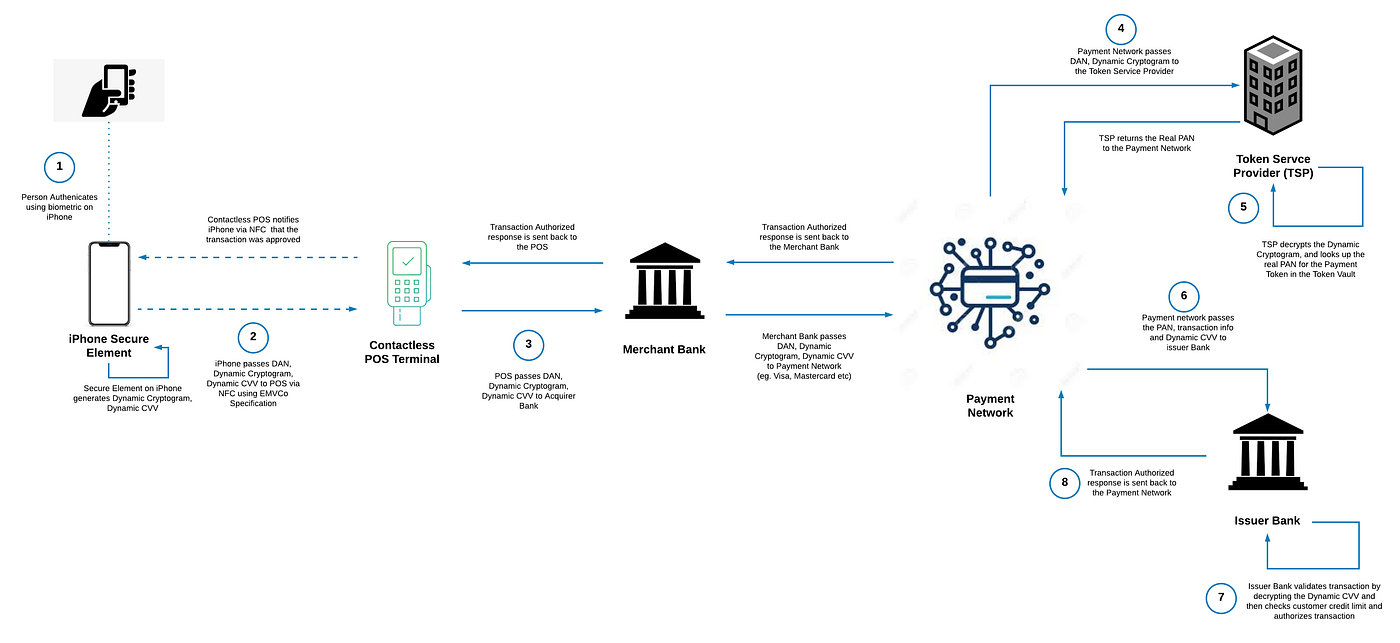
When you hold your phone to a terminal:
1. The phone detects the NFC field and shows your default card. You double-click the side button, that’s the Secure Intent gesture going directly to the Secure Enclave, and authenticate with Face ID, Touch ID, or your passcode.
2. The Secure Element generates a one-time Dynamic Cryptogram using the Payment Token Key and a transaction counter, plus a Dynamic CVV using the bank’s CVV Key. Both are unique to this transaction. They can’t be reused.
3. The SE sends the DAN, cryptogram, dynamic CVV, and chip data to the terminal over NFC. Your real card number never leaves the Secure Element. It never touches the Application Processor.
“The payment applets in the Secure Element prepare contactless responses. The controller then routes them to the NFC field. In this way, the payment details stay within the NFC field and never reach the Application Processor.” — How Apple Pay keeps users’ purchases protected
4. From there it’s a standard auth chain, POS to acquirer, to payment network, to TSP for de-tokenization, to issuer for approval. Response comes back the same path.
All done in under two seconds, end to end.
Why This Beats Your Physical Card
Your PAN never touches the merchant. They get the DAN and a one-time cryptogram. If they get breached, your actual card number isn’t in their system as it was never there.
Replay attacks don’t work. Every transaction gets its own cryptogram and CVV. If one is captured, it’s already dead.
You can’t use it without biometrics. Someone steals your phone, they still need your face or fingerprint. A stolen physical card works at every contactless terminal under the tap limit with zero verification.
Malware can’t reach the payment data. Even on a compromised iPhone, the Secure Element is on a separate chip with a separate bus. iOS doesn’t have access to what’s stored in there.
The DAN is locked to your device. A stolen PAN works everywhere, online, over the phone or cloned to a mag stripe. A DAN only works on the device it was issued to, and issuers can restrict which channels it’s valid on.
Apple can’t decrypt the tokens stored on your device. They state this explicitly in their documentation.
What Can Still Go Wrong
As we all know, nothing is bulletproof.
Phishing. Still the number one threat. Fake Apple billing emails that lead to vishing calls where scammers pull credentials or 2FA codes out of people. Apple will never ask you to call a number from an email.
Card provisioning fraud. If someone already has your stolen card details from another breach and can get past your bank’s SMS verification, they can add your card to their device. That’s weak bank-side identity verification, not an Apple Pay flaw.
Express Transit. Lets payments through without Face ID for public transit. It’s a convenience trade-off. If you don’t ride the metro, I would recommend to turn it off.
Jailbreaking. You’re weakening the trust chain between iOS, the Secure Enclave, and the Secure Element.
How Does Google Pay Compare?
A question I get a lot - is Apple Pay actually more secure than Google Pay?
The short answer is yes, but the gap is more narrow than people think. Both use tokenization and both are significantly better than physical cards. However, the architecture under the hood is different in ways that matter. The difference comes down to hardware vs software isolation, and how much visibility each company has into your transactions.
A Note on the ByteByteGo Diagram
There’s a popular diagram from ByteByteGo that gets shared constantly when people compare Apple Pay and Google Pay.
The provisioning flow is oversimplified. The diagram combines card setup and payment into one flow, and oversimplifies both. During provisioning, it shows the iPhone passing card info directly to the bank. In reality, it goes to Apple’s servers first, since Apple needs the PAN to route it to the correct payment network. The DAN comes back through Apple before being provisioned to the Secure Element. Apple states they don’t store the PAN, but they are in the chain during initial setup.
It conflates NFC and e-commerce flows. For in-store NFC payments, Apple’s servers are not involved, the Secure Element talks directly to the terminal. However, for in-app or web payments, Apple receives the encrypted transaction, re-encrypts it with a developer-specific key and passes it to the merchant. Apple retains anonymous transaction metadata for e-commerce payments. The diagram doesn’t distinguish between these two flows.
The Google side is one example. Not every Android device runs cloud-based Host Card Emulation. Many Samsung phones have a hardware Secure Element. Pixels use the Titan M chip. The diagram shows the cloud-only HCE flow and presents it as the whole picture which is not accurate.
Both sides skip the TSP. Neither side of the diagram shows the Token Service Provider (VTS, MDES, AETS), the entity that actually generates the token and maintains the vault mapping it back to your PAN. That’s a pretty important part of the architecture to leave out.
The diagram isn’t useless, it captures the high-level idea that Apple’s token lives on a hardware chip while Google’s flow involves their servers. But if you’re making security decisions based on it, you’re working with an incomplete picture.
Apple Pay stores the DAN on a dedicated Secure Element chip. For in-store contactless payments, the NFC controller talks directly to the SE on a hardware bus, the Application Processor never sees the payment data, and Apple’s servers aren’t involved. For in-app and web payments, Apple does act as an intermediary to re-encrypt the transaction with a merchant-specific key, though they state they don’t store your card number and retain only anonymized transaction metadata.
Google Pay primarily uses Host Card Emulation (HCE), a software-based approach where tokens are managed through Google’s cloud servers, though some Android devices like Samsung and Pixel phones do have hardware Secure Elements. Google acts as an intermediary in the payment flow, which gives them visibility into your transaction data.
Here’s why that matters:
Hardware isolation: Apple has a dedicated, physically separate chip. Google uses a software-secured region of the main processor or cloud-based management. The SE is a harder target.
Privacy: For in-store payments, Apple has zero visibility into your transactions. For e-commerce, they retain only anonymized metadata. Google processes all transaction types through their servers and has full visibility.
“Apple retains anonymous transaction information, including the approximate purchase amount, app developer and app name, approximate date and time, and whether the transaction completed successfully.” — Apple Pay security and privacy overview
Offline support: Apple Pay works fully offline for contactless. Google Pay needs connectivity for most transactions since auth routes through Google’s servers.
Device fragmentation: Apple controls the entire hardware stack. Google supports thousands of Android devices with varying security capabilities, which is why they went with HCE over requiring a hardware SE.
Both are EMVCo tokenized. Both generate per-transaction cryptograms. Both require biometric or PIN auth. Both are leagues ahead of swiping a physical card.
What You Should Do
I would recommend the following:
- Use Apple Pay instead of your physical card wherever you can.
- Don’t jailbreak your iPhone.
- Use at least a 6-digit or alphanumeric passcode, not a 4-digit PIN.
- Enable 2FA wherever you can, especially for your Apple ID.
- Check your Express Transit settings if you’re not using the metro.
Sources:
- Apple Platform Security Guide (December 2024)
- Apple Pay Merchant Integration Guide (September 2025)
- Apple Pay Security and Privacy Overview
- Apple Pay Component Security
- Payment Authorization with Apple Pay
- Card Provisioning Security Overview
- EMVCo Tokenization
- ByteByteGo — How Apple Pay and Google Pay Work
- Google Wallet — Keep Your Payment Info Safe
- Android Trusted Execution Environment
- Host Card Emulation — Android Developers